
You've already done the obvious things. You raised the monitor. You bought a standing desk. You swapped in a vertical mouse. You may even have a chair with every lever and lumbar adjustment available.
And yet your neck still tightens by midafternoon, your wrist starts talking during email-heavy days, or your low back gets worse after alternating between sitting and standing.
That's the gap most ergonomic advice misses. In Boston, a lot of professionals in Seaport tech offices, Back Bay consulting firms, and Financial District towers don't need more furniture recommendations. They need someone to look at how their body is handling work over the course of a real day. Workplace ergonomics physical therapy in Boston is useful because it connects the desk setup to the person using it.
The Desk Setup That Still Causes Pain
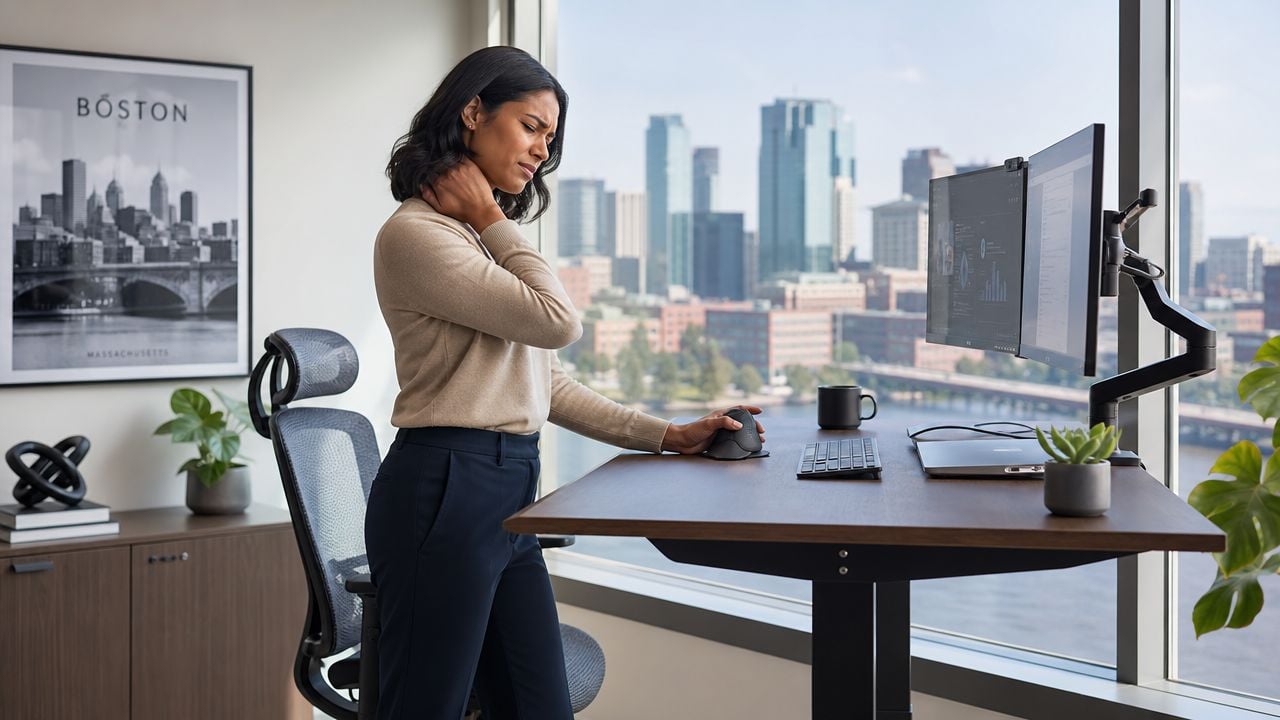
A common Boston scenario looks like this. You work partly from a sleek office near South Station or the Seaport, partly from home in Brookline or the South End. At the office, you have a sit-stand desk and dual monitors. At home, you use a kitchen chair, a laptop stand, and whatever surface is open that day. On paper, everything seems “ergonomic.”
But pain doesn't care what the product box promised.
When good equipment still fails
The usual online fixes help with obvious issues. A better chair can improve support. If you're comparing options, Tanger's Furniture ergonomic chair guide is a useful place to review chair features before you buy. But the chair itself usually isn't the full answer.
A person can sit in an expensive chair and still lean forward all day. A standing desk can still place the keyboard too high. A monitor arm can still leave someone rotating their neck toward one side for hours. Equipment changes the environment. It doesn't automatically change behavior.
Most persistent desk pain comes from the interaction between setup, habits, workload, and tissue tolerance. Not from one “bad” chair alone.
What Boston professionals usually notice first
The early complaints tend to be predictable:
- Neck stiffness by lunch: often tied to forward reach, screen position, or sustained upper trap tension
- Wrist and forearm irritation: common with heavy trackpad use, poor mouse placement, or bent wrist posture
- Low back ache late in the day: often linked to static sitting, unsupported feet, or switching between workstations that all feel different
That's why a clinical ergonomics approach matters. Instead of asking only whether the desk is set up correctly, it asks a more useful question. Why does this specific person still hurt in this specific setup?
Why Poor Ergonomics is a Boston-Wide Problem
A Boston software engineer works from a clean Back Bay office three days a week, then spends two days at a kitchen table in Somerville with a laptop and no external monitor. A financial analyst in the Seaport sits through long spreadsheet blocks, then shifts to after-hours work on a second setup at home. A hospital administrator moves between charting, calls, and documentation with very little variation in arm position. Different jobs, same pattern. Pain builds because the body keeps absorbing the same load in slightly different forms.
That pattern shows up across Boston because the city concentrates exactly the kinds of work that irritate the neck, back, and wrist over time. Tech and finance demand long stretches of screen focus. Healthcare and research add repetitive hand use, sustained standing, and awkward reaching. Hybrid work adds inconsistency, which is one of the biggest reasons people tell me, “I fixed my desk, so why do I still hurt?”
The local burden is real
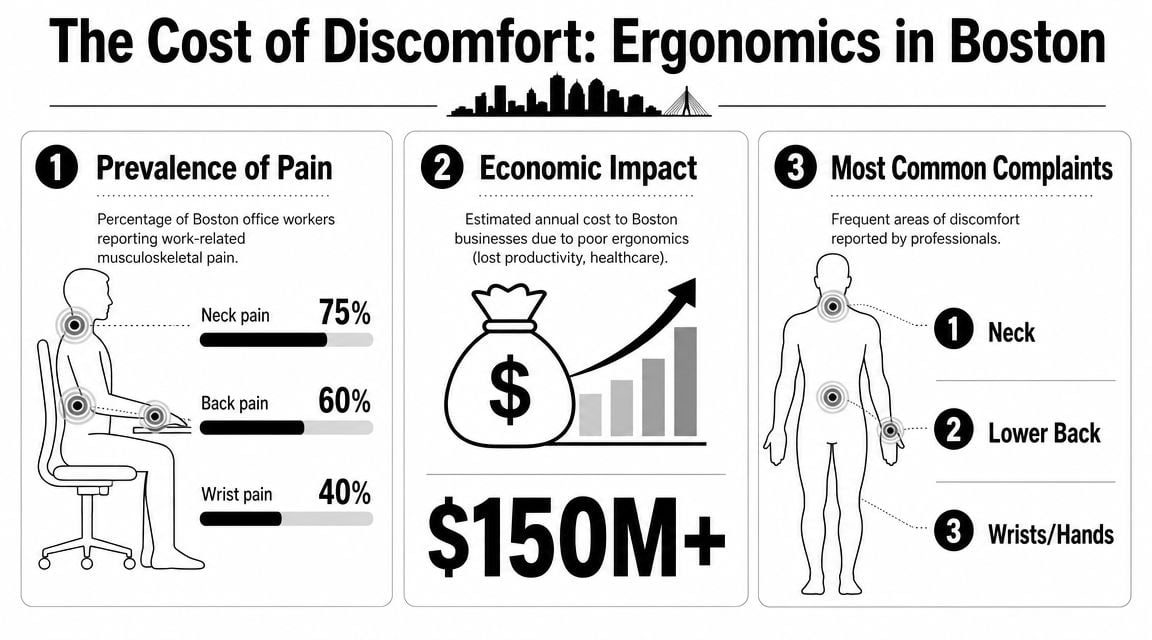
A study of workers at two Boston hospitals found that 74% reported musculoskeletal pain in the prior 3 months, 53% reported low-back pain, and 32.8% said pain interfered with work, as summarized in this PubMed Central report. That study was not limited to desk workers, but it reflects a local truth clinicians see every week. Boston workers often keep performing at a high level while pain gradually narrows how they sit, type, reach, and concentrate.
The same report described physical exposure during shifts. Workers spent an average of 74% of a shift in an upright trunk posture and 19% in a flexed trunk posture. The practical takeaway is simple. Being on your feet or changing tasks does not automatically protect you if the same tissues keep taking the load.
The cost shows up before anyone files a claim
For employers, the first loss is usually not a formal injury case. It is reduced tolerance for focused work, more frequent position changes during meetings, slower mouse and keyboard use, and workers avoiding tasks that provoke symptoms.
Boston companies feel that in predictable ways. Engineers stay productive but finish the day with neck tension that carries into sleep. Finance teams push through wrist or forearm irritation during reporting cycles. Hybrid employees lose hours each week readjusting between setups that never feel the same twice.
Practical rule: If someone is changing how they type, sit, stand, or use the mouse to get through the day, the problem already deserves clinical attention.
Why this keeps showing up across industries
The details vary by job, but the mechanism is usually consistent. Repeated posture, repeated reach, repeated mouse use, and too little movement variety. Furniture matters, but it does not explain the whole problem. Two employees can use the same workstation and have very different outcomes because joint mobility, muscle endurance, workload, and stress tolerance differ from person to person.
That is why Boston's mix of industries produces so many recurring pain patterns:
| Work setting | Typical strain pattern | Common result |
|---|---|---|
| Tech and finance offices | Long screen time, dual monitors, low movement variety | Neck, shoulder, and wrist symptoms |
| Healthcare environments | Repetition, lifting, sustained positioning | Back and upper-extremity overload |
| Hybrid work | Different desks, chairs, and laptop setups | Symptoms that flare unpredictably |
In practice, poor ergonomics across Boston is less about one bad chair and more about exposure. The same movement, the same posture, and the same workstation habits repeated for months will irritate tissue faster than people expect. A physical therapist looks at that full pattern, which is usually the missing piece after equipment changes stop helping.
The Joint Ventures Ergonomic Assessment Process
A Boston employee gets through the first hour fine, then the neck tightness starts. By lunch, the right wrist is irritated. By the end of the day, the low back joins in, even though the monitor is raised, the chair is new, and the desk already looks "ergonomic."
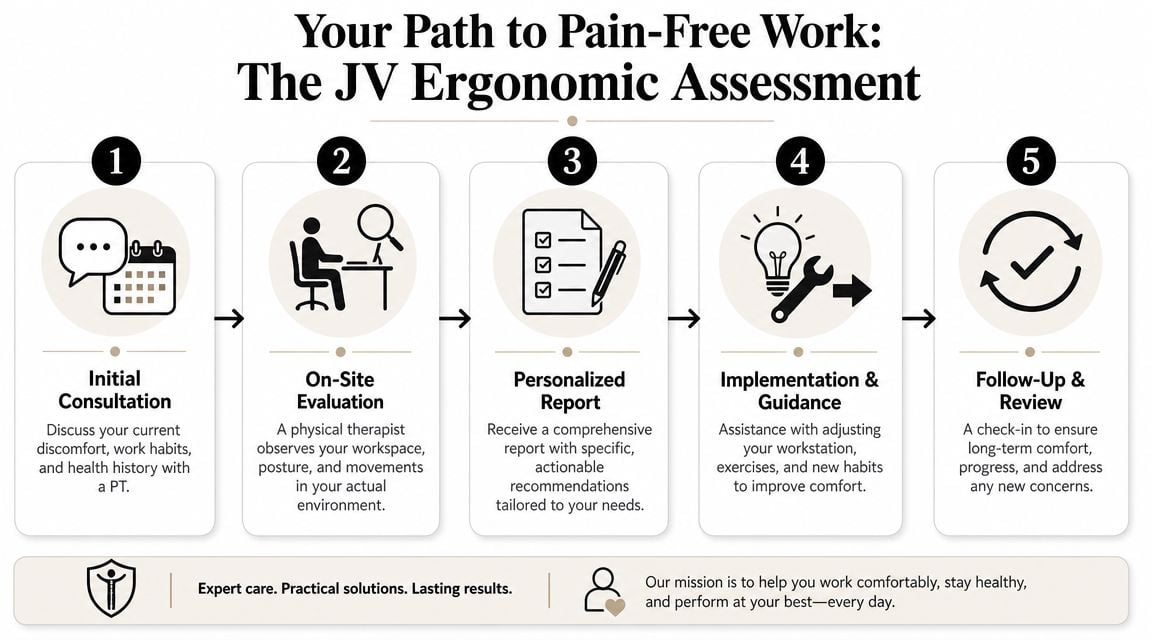
That is the point where a PT-led assessment becomes useful. We do not start with a furniture checklist. We start with the symptom pattern, the work demands, and how your body handles them over a full workday.
Step one starts with the pain pattern
The first questions are specific. When does the pain begin? Which task sets it off? Does it build during spreadsheets, typing, trading screens, Zoom meetings, coding, phone use, or standing blocks at a home desk? Does it ease after you log off, or stay with you into the evening commute?
Those answers narrow the problem quickly. A wrist issue that appears during heavy mouse use is different from wrist pain that lingers during rest. A back flare-up that starts after thirty minutes in one chair points to a different problem than pain that appears every time you shift between office and home setups.
The workstation is measured against your body
There are standard targets most clinicians look for. Feet supported. Knees and hips positioned comfortably. Forearms able to rest without shrugging the shoulders. Monitor height that does not force repeated neck flexion or rotation.
Then we test whether those positions are realistic for you.
A workstation can look correct in a photo and still fail in real use. If you have limited hip mobility, reduced thoracic extension, poor shoulder endurance, or a habit of reaching with one side, the "right" setup may still produce symptoms. That is why the assessment includes both the desk and the person sitting at it.
Typical review points include:
- Chair and lower body support: whether your feet are supported, whether seat depth matches your leg length, and whether you slide forward to reach the keyboard
- Keyboard and mouse placement: whether your wrists stay neutral, whether your elbows are too far from your sides, and whether one arm does most of the work
- Monitor position: whether you rotate toward one screen, poke the chin forward, or keep looking down at a laptop
- Desk height in sitting and standing: whether the surface fits your body or forces you to work with lifted shoulders or bent wrists
Movement during work usually explains the symptoms
This is the part generic ergonomic services often miss. A PT watches what happens after you settle in and start working.
Some people sit well for ten seconds, then perch on the edge of the chair, brace through the toes, reach for the mouse, and lock the neck toward one screen. Others collapse into one hip during long calls or type with extended wrists once concentration increases. The setup matters, but behavior under load matters just as much.
I also look beyond the desk when the symptoms point there. Repeated low back pain is not always coming from lumbar support. In some cases, foot mechanics and standing tolerance are part of the problem, especially for employees splitting time between office shoes, commuting, and standing desks. That pattern overlaps with the symptoms of foot-related back pain.
You leave with changes you can use
A useful assessment ends with a plan that fits your actual workday. That may mean a monitor change, a keyboard tray adjustment, a different mouse position, a standing schedule with limits, or short movement resets placed between meetings instead of vague advice to "sit better."
When symptoms are already established, equipment changes alone are rarely enough. Joint Ventures Physical Therapy pairs workstation review with a musculoskeletal exam from a licensed PT, which helps separate a setup problem from a mobility, strength, or load-tolerance problem. If you have ever wondered which clinician handles what in a workplace injury case, this breakdown of occupational therapy vs physical therapy gives useful context.
That combination is what turns ergonomic advice into treatment decisions.
Beyond the Chair Why a PT is Essential for Ergonomics
The biggest misconception in office ergonomics is that pain should disappear once the desk is “correct.” Sometimes it does. Often it doesn't.
That's not a failure of ergonomics. It's a sign that pain is being driven by more than furniture.
Setup problems and body problems overlap
General ergonomic guidance can identify obvious workstation issues, but it often stops there. Boston Medical Center's workplace injury guidance highlights the significant gap: when symptoms continue after a setup is fixed, a clinician needs to evaluate movement patterns, repeated load, and the underlying drivers of pain.
That's where physical therapy matters.
A therapist looks at whether your neck pain is tied to prolonged screen use plus poor shoulder control. Whether your wrist pain shows up because you type with extended wrists and grip the mouse too hard. Whether your low back keeps flaring because you shift between chairs that all force you into different positions your body doesn't tolerate well.
Persistent pain usually has a pattern
A few examples show why chair-only solutions come up short:
- Neck pain: sometimes the screen is too low. Sometimes the underlying issue is sustained forward head posture during concentrated work and poor tolerance for static sitting.
- Low back pain: sometimes the seat depth or lumbar support is off. Sometimes the irritation starts lower in the chain. Foot mechanics can influence posture and loading, and symptoms of foot-related back pain can give patients a useful starting point for understanding that connection.
- Wrist pain: sometimes the keyboard angle is the culprit. Sometimes workload, grip tension, and repetition are the bigger drivers.
This is also where the distinction between rehab disciplines can matter. If your job demands fine motor control, hand use, or task-specific upper-extremity function, it can help to understand what occupational therapy vs physical therapy means in a workplace setting.
What a PT adds that a furniture checklist doesn't
A PT brings three things to ergonomics that standard desk advice usually can't:
| What gets reviewed | Furniture-only approach | PT-led approach |
|---|---|---|
| Desk and chair setup | Yes | Yes |
| Symptom behavior during tasks | Limited | Yes |
| Movement habits and repeated load | Rarely | Yes |
| Rehab plan for ongoing pain | No | Yes |
If your pain returns every workday, the problem usually isn't just where the monitor sits. It's how your body is tolerating the total workload.
That's why workplace ergonomics physical therapy Boston searches for the mismatch between the job and the worker, then addresses both sides.
Ergonomics for Boston's Hybrid Work Reality
Boston's hybrid schedule has changed what “good ergonomics” even means. Many people now work from a polished office in Back Bay one day, a home setup the next, and a laptop at a kitchen counter or coworking space later in the week.
The result is inconsistent input. Different chair heights. Different monitor distances. Different keyboard positions. The body has to keep adapting, and it often does that poorly.
One perfect workstation isn't the real goal
For many professionals, the old model was simple. Fix one desk and maintain one routine. That's less realistic now.
Postural Physical Therapy's ergonomics overview highlights a key issue for today's workforce: many employees split time across multiple workstations, which makes a single “perfect setup” less relevant. The practical focus shifts toward adaptive strategies, changing posture, and taking movement breaks.
That's a better match for how people work in Boston now.
What works better in hybrid schedules
Instead of chasing one flawless setup, hybrid workers usually do better with a repeatable system:
- Build a portable baseline: laptop stand, separate keyboard, separate mouse, and a way to support the feet if needed
- Prioritize the highest-use station: the place where you spend the most hours should get the most attention
- Use transition habits: reset the screen, chair, and mouse each time you change locations
- Treat movement as part of ergonomics: not as an afterthought
In-person and virtual both have a role
There's no single right format for every employee or employer.
If the main problem is a corporate workstation with fixed equipment, in-person assessment often makes sense. If symptoms are driven by home-office variability, a virtual evaluation can still be very effective because the therapist sees the actual environment, not the cleaned-up office version.
A good hybrid ergonomics plan usually includes both environmental advice and behavior coaching. That means where to place equipment, how to rotate between positions, and what to change when one workstation can't be made ideal.
Boston professionals don't need abstract posture lectures. They need ergonomic strategies that survive a week split between Seaport, Cambridge, Brookline, and home.
Common Workstation Mistakes and PT-Approved Fixes
Most workstation problems aren't dramatic. They're small mismatches repeated all day. A laptop used too low. A mouse placed too far out. A seat that's technically adjustable but never adjusted correctly.
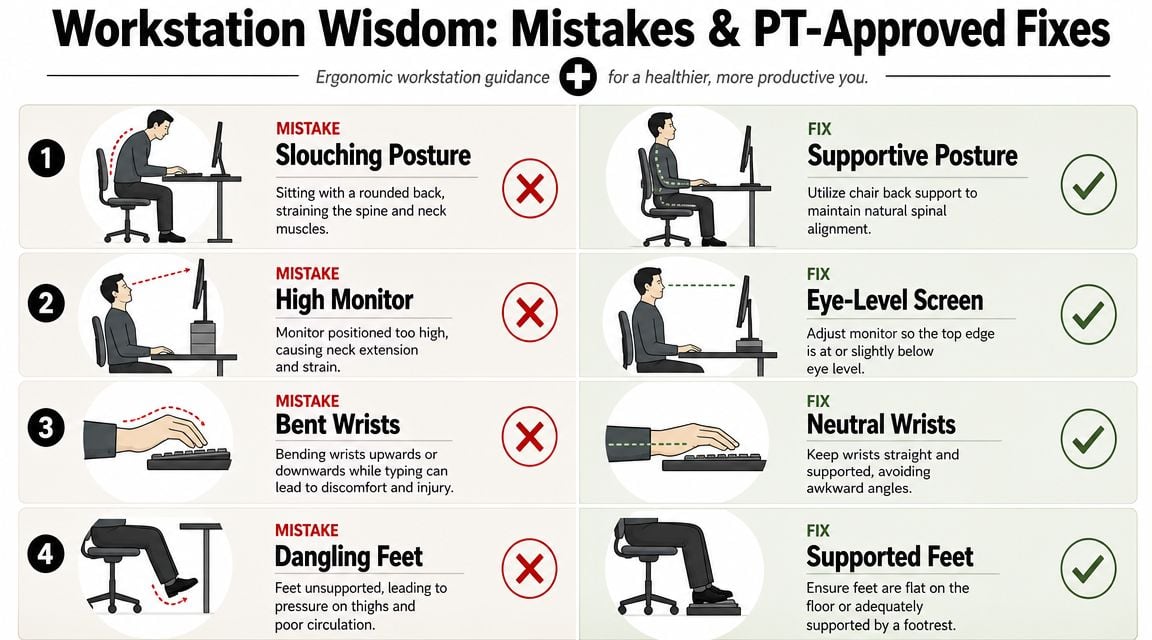
This visual guide covers the common ones.
Frequent errors that show up fast
Here are some of the issues clinicians see most often:
- Laptop-only work for long stretches: The screen is too low and the keyboard is attached, so your neck and wrists can't both be in a good position.
- Feet hanging or tucked under the chair: This reduces support and often shifts strain into the low back.
- Mouse too far away: That small reach loads the shoulder and neck more than people expect.
- Standing desk set too high: Shoulders rise, wrists extend, and tension creeps in.
A separate keyboard and mouse are often the quickest fix for laptop users. If your home setup includes softer seating for short work blocks, ergonomic sofas at Tyner Furniture can be a helpful reference for understanding what supportive seating features look like, though sofas still shouldn't replace a proper primary workstation.
PT-approved fixes you can apply today
| Mistake | Better adjustment |
|---|---|
| Looking down at a laptop | Raise the screen and use separate input devices |
| Bent wrists while typing | Bring keyboard closer and keep wrists more neutral |
| Dangling feet | Lower the chair or add a footrest |
| Reaching for the mouse | Keep it close to the keyboard at the same level |
| Slumping away from backrest | Sit fully back and use the chair's support |
A short movement routine also helps, especially when the day gets meeting-heavy. This video is a good add-on for people who need quick workstation reminders during the day.
Don't rely on posture alone
Good ergonomics doesn't mean freezing yourself in one perfect pose. It means reducing awkward positions and changing load before symptoms build.
For more practical guidance on reducing desk-related strain at work, Joint Ventures also has a helpful article on injury prevention in the workplace.
The most sustainable desk posture is the one you can vary before discomfort spikes.
Schedule Your Ergonomic Assessment in Boston Today
If you're still hurting after buying new equipment, it's time to stop treating this like a shopping problem. It's a clinical one.
A PT-led ergonomic assessment looks at your real work demands, your actual symptom pattern, and the body mechanics that keep reproducing the same pain. That's what makes it useful for Boston professionals who spend long hours at a desk, commute between neighborhoods, or split time across office and home.
Where to get care in Greater Boston
Joint Ventures serves professionals across the city, with access points in Back Bay, Kenmore Square, Fort Point and Seaport, Downtown Boston, and surrounding neighborhoods. That makes it easier to schedule care near where you live or work instead of waiting until symptoms become disruptive enough to force the issue.
If you want service details before booking, review the clinic's workplace ergonomics program.
What to do next
A smart next step is straightforward:
- Book an evaluation: choose the location that fits your workweek
- Bring your setup questions: office desk, home office, standing desk, laptop use, commute habits
- Be specific about your symptoms: neck, wrist, shoulder, back, or combinations that change by task
- Ask about insurance and scheduling: the admin team can help verify benefits and reduce friction before your first visit
If you want deeper clinical education on injury recovery, movement, and physical therapy topics beyond this local guide, visit Highbar Health for broader resources.
The main point is simple. You don't need to keep guessing which gadget might finally fix your workday pain. You need an assessment that explains why your current routine keeps producing the same symptoms, then gives you a plan you can follow in Boston's real work environment.
If desk work is leaving you with neck tension, wrist pain, or an end-of-day back ache, book an ergonomic evaluation with Joint Ventures Physical Therapy. With convenient Greater Boston locations and one-on-one care, you can get a practical plan for your office, home setup, and hybrid schedule instead of another round of trial and error.